The promise loop: from a question to evidence
In this tutorial you ask one question about the Orders system: “What happens if the broker fails after the order is accepted?” You state the answer as a promise, check it, and see the promise fail when a change removes the outbox.
The tutorial uses no AI provider and no GitHub account.
You declare the flow in the terminal. After that, each step has two ways: In the app and With the HTTP API. Use one way for the full tutorial. The terminal commands use the variables of the commands before them, so a command does not work after a step that you did in the app.
Before you start
Section titled “Before you start”- Complete Import a repository and review the proposals. You then have the project Orders import, with every proposal of
acme/ordersatmainaccepted, and the GitHub stand-in is running. - You need
curl,jqanduuidgen.
Sign in from the terminal
Section titled “Sign in from the terminal”-
Set the address of your instance and your account. Use the same terminal for every step of this tutorial.
Terminal window export VELLUM_URL=http://localhost:8080export VELLUM_EMAIL=<email>export VELLUM_PASSWORD=<password> -
Sign in. The command keeps the session cookie in the file
vellum.cookies.Terminal window jq -n --arg email "$VELLUM_EMAIL" --arg password "$VELLUM_PASSWORD" '{email: $email, password: $password}' |curl -sS --fail-with-body -c vellum.cookies -H 'content-type: application/json' -d @- "$VELLUM_URL/api/auth/login" -o /dev/nullcurl -sS --fail-with-body -b vellum.cookies "$VELLUM_URL/api/auth/me" | jq -r .emailThe second command prints your email address.
-
Find the project, and define a short command for its API.
Terminal window WORKSPACE=$(curl -sS --fail-with-body -b vellum.cookies "$VELLUM_URL/api/workspaces" | jq -r '.[0].id')PROJECT=$(curl -sS --fail-with-body -b vellum.cookies "$VELLUM_URL/api/workspaces/$WORKSPACE/projects" |jq -r '.[] | select(.name == "Orders import") | .id')api() {curl -sS --fail-with-body -b vellum.cookies -H 'content-type: application/json' -X "$1" "$VELLUM_URL/api/projects/$PROJECT/$2" ${3:+-d "$3"}}echo "$PROJECT"The command prints the ID of the project. If it prints nothing, your first workspace has no project with the name Orders import.
Declare the flow
Section titled “Declare the flow”The import gave you what the source shows: services, operations, channels and one message. It gave you no behaviour. A promise needs a scenario to check, so you declare one.
-
Read the IDs of the parts that the scenario names.
Terminal window ORDERS_API=$(api GET elements | jq -r '.items[] | select(.name == "Orders.Api") | .id')DATABASE=$(api GET elements | jq -r '.items[] | select(.name == "postgres") | .id')PLACE_ORDER=$(api GET operations | jq -r '.items[] | select(.name == "POST /orders") | .id')ORDER_EVENTS=$(api GET channels | jq -r '.items[] | select(.name == "order-events") | .id')ORDER_CREATED=$(api GET messages | jq -r '.items[] | select(.name == "OrderCreated") | .id')echo "$ORDERS_API $DATABASE $PLACE_ORDER $ORDER_EVENTS $ORDER_CREATED"The command prints five IDs.
-
Add the two parts that the source does not show: the customer, and the operation that relays the outbox. Both get the label
declared, because you state them.Terminal window CUSTOMER=$(uuidgen | tr '[:upper:]' '[:lower:]')RELAY=$(uuidgen | tr '[:upper:]' '[:lower:]')api POST elements "$(jq -n --arg id "$CUSTOMER" '{id: $id, kind: "actor", name: "Customer", tags: []}')" | jq -r .factStatusapi POST operations "$(jq -n --arg id "$RELAY" --arg owner "$ORDERS_API" \'{id: $id, ownerId: $owner, name: "Relay outbox", transport: "command", retry: {maxAttempts: 3, backoffMs: 1000}}')" | jq -r .nameThe commands print
declaredandRelay outbox. -
Save the scenario. The Orders API stores the order and the event in one write to the database. The relay then publishes the event, and tries again after a failure.
Terminal window SCENARIO=$(uuidgen | tr '[:upper:]' '[:lower:]')jq -n --arg id "$SCENARIO" --arg customer "$CUSTOMER" --arg api "$ORDERS_API" --arg db "$DATABASE" \--arg place "$PLACE_ORDER" --arg relay "$RELAY" --arg channel "$ORDER_EVENTS" --arg message "$ORDER_CREATED" '{id: $id,name: "Place an order",steps: [{type: "call", id: "place", from: $customer, operation: $place, request: null, response: null, onError: [], then: [{type: "write", id: "save-order", by: $api, store: $db, dataset: "orders", change: {orderId: "o-1", status: "accepted"}},{type: "write", id: "save-outbox", by: $api, store: $db, dataset: "outbox", change: {type: "OrderCreated", orderId: "o-1"}}]},{type: "call", id: "relay", from: $api, operation: $relay, request: null, response: null, onError: [], then: [{type: "publish", id: "publish-order-created", from: $api, channel: $channel, message: $message, headers: {}, handlers: {},payload: {orderId: "7d0f1a6e-3c1b-4f5e-9a51-0f4f0c1d2e3f", customerId: "2b8a9c10-5d4e-4f60-8a7b-9c0d1e2f3a4b", total: 4.2, createdAt: "2026-01-01T10:00:00Z"}}]}],faults: [],assertions: [{type: "outcome", id: "order-accepted", step: "place", expected: "Succeeded"},{type: "outcome", id: "order-created-reaches-the-broker", step: "publish-order-created", expected: "Succeeded"}]}' > place-an-order.jsonapi POST scenarios "$(cat place-an-order.json)" | jq -r .nameapi POST "scenarios/$SCENARIO/run" | jq -c '{issues: (.issues | length), events: [.events[].kind], passed: [.assertions[].passed]}'The last command plays the scenario and prints:
{"issues":0,"events":["RequestSent","DataWritten","DataWritten","ResponseReceived","RequestSent","Published","Routed","Delivered","ResponseReceived"],"passed":[true,true]} -
In the app, open the project, open Scenarios in the left toolbar and select the play button of Place an order. The dock at the bottom of the canvas plays the nine events.
The payload of publish-order-created matches the schema of OrderCreated that the import read from asyncapi.yaml. A payload that does not match the schema stops the playback with the problem schema-mismatch.
Declare the promise
Section titled “Declare the promise”In the app:
- Open the project and select Promises in the left toolbar.
- In Prefix (2 to 6 letters), enter
ORD. In First number, enter14. The line below the fields showsORD-014. - Select Set the prefix. A project gets its prefix one time.
- Select New.
- In Title, enter
An accepted order must survive a broker outage. - Fill Claim, Scope, Preconditions, Expected outcome, Forbidden outcome and What counts as evidence with the texts of the command in step 2 below.
- Below Forbidden events, select Add a forbidden event. Keep
Droppedand Anywhere in the scenario. - Below Required source pattern, select The source of a repository must declare a pattern. Keep
acme/orders,transactional-outboxand The whole repository. - Below Linked to, select Place an order, POST /orders · Orders.Api, order-events, OrderCreated and Orders.Api.
- Select Create draft. The title of the dialog starts with
ORD-014.
You choose each part of the model by its name. You do not enter an ID.
With the HTTP API:
-
Set the prefix of the requirement IDs.
startAtgives the number of the first promise.Terminal window api PUT promises/prefix '{"prefix": "ORD", "startAt": 14}' | jq -c .{"prefix":"ORD","nextNumber":14}A project gets its prefix one time. If the project already has a prefix, this call answers
409and the promise gets the next number of that prefix. -
Create the draft.
linksbinds the promise to exact IDs of the model.forbiddenEventsandrequiresPatternare the parts of the promise that a check can read.Terminal window jq -n --arg scenario "$SCENARIO" --arg place "$PLACE_ORDER" --arg channel "$ORDER_EVENTS" --arg message "$ORDER_CREATED" --arg api "$ORDERS_API" '{title: "An accepted order must survive a broker outage",claim: "When the Orders API accepts an order, OrderCreated reaches the broker, also when the broker is down at the time of acceptance.",scope: "POST /orders and the OrderCreated event on order-events.",preconditions: "The order is valid. The database is available. The broker is down when the order is accepted and comes back later.",expectedOutcome: "The order is stored, the request reports success, and OrderCreated is published when the broker is back.",forbiddenOutcome: "The request reports success and OrderCreated is lost.",evidenceCriteria: "The declared flow holds with a broker outage, and the source of the Orders API declares a transactional outbox.",forbiddenEvents: [{kind: "Dropped"}],requiresPattern: {repository: "acme/orders", pattern: "transactional-outbox"},links: {scenarioIds: [$scenario], operationIds: [$place], channelIds: [$channel], subscriptionIds: [], messageIds: [$message], elementIds: [$api]}}' > promise.jsonPROMISE=$(api POST promises "$(cat promise.json)" | jq -r .id)api GET "promises/$PROMISE" | jq -c '{requirementId, state, origin}'{"requirementId":"ORD-014","state":"draft","origin":"human"}
A draft is not a requirement. Nothing counts it until an owner approves it.
Generate the obligations
Section titled “Generate the obligations”An obligation is one check that gives evidence for the promise. Vellum generates obligations from the links. It never adds a result.
In the app:
- In the dialog of
ORD-014, select Generate from the links. The list Obligations showsORD-014/O1,ORD-014/O2andORD-014/O3. - Select the pencil button of
ORD-014/O1. Its name is Change ORD-014/O1. - In Title, enter
The order flow holds while the broker is down. - Below Faults, select Add a fault. Keep order-events (channel), Outage and
1in Fails the first. You can select only the parts that the steps of the scenario name. - Select Save the obligation.
To add an obligation that the links do not give, select Add an obligation and select its Kind. If the server refuses a value, the message shows below the field of that value.
With the HTTP API:
-
Generate them.
Terminal window api POST "promises/$PROMISE/obligations/generate" > generated.jsonjq -r '.promise.current.obligations[] | "\(.key) \(.kind) \(.title)"' generated.jsonO1 scenario-check Scenario 'Place an order' holds on the declared designO2 contract-test Orders.Api: POST /orders keeps its contractO3 source-pattern-check acme/orders declares the transactional-outbox pattern -
Change
O1so that it asks your question. The check plays the scenario with an outage oforder-eventsfor the first publish.Terminal window jq --arg channel "$ORDER_EVENTS" '.promise.current.obligations[0].recipe| .scenarioCheck.faults = [{target: $channel, kind: "Outage", failFirst: 1}]| {kind: "scenario-check", title: "The order flow holds while the broker is down", recipe: .}' generated.json > o1.jsonapi PUT "promises/$PROMISE/obligations/O1" "$(cat o1.json)" | jq -r '.current.obligations[0].title'The command prints the new title.
O1 and O3 are checks that Vellum can run. O2 is a test plan. Vellum cannot run a test plan: a person or a CI job runs the test, and its result is recorded as evidence. See Declare a promise.
Approve the promise
Section titled “Approve the promise”Only a workspace owner can approve. An agent token cannot.
In the app:
- Open Promises in the left toolbar and select ORD-014. Read every field and every obligation.
- Read the box above the buttons. It says Approval is blocked: and gives each cause, or it says that nothing on the screen blocks approval.
- Select Approve revision 1.
With the HTTP API:
-
Read the promise:
api GET "promises/$PROMISE". -
Approve the revision that you read. An approval names the revision and its content hash. If the draft changed after you read it, Vellum answers
409with the typerevision_changedand approves nothing.Terminal window HASH=$(api GET "promises/$PROMISE" | jq -r '.revisions[] | select(.revision == 1) | .contentHash')api POST "promises/$PROMISE/approve" "$(jq -n --arg hash "$HASH" '{revision: 1, contentHash: $hash}')" | jq -c '{state, inForceRevision}'{"state":"approved","inForceRevision":1}
Run the checks
Section titled “Run the checks”In the app:
- In the dialog of
ORD-014, select Run onORD-014/O1. The label becomes Passed. Below it you read what the check played, the model version, the faults and each assertion that shows nothing. - On
ORD-014/O3, keep the scanmainin the list and select Run against this scan. The label becomes Passed, with the source lines. ORD-014/O2stays Not run. It is a test plan.- Select Show on canvas. The dialog closes, and the canvas rings the parts of the model that the promise and its flow name.
With the HTTP API:
-
Run the scenario check.
Terminal window api POST "promises/$PROMISE/obligations/O1/run" '{}' | jq -r '.result, .detail'passedAll 3 assertion(s) hold. 2 of them are vacuous and show nothing: [order-accepted] The faults that were played do not reach step 'place': its playback is the same with and without them. [forbidden-1-Dropped] No step of the scenario can emit a Dropped event under the faults that were played, so a count of zero shows nothing.The check passes: the first publish fails, the relay tries again, and the event reaches the broker. Vellum also tells you what the check does not show. Two of the three assertions hold with and without the outage, so they are not evidence for this promise.
-
Run the source check against the scan of
main. A source check needs a scan to read.Terminal window MAIN_SCAN=$(api GET imports | jq -r '[.items[] | select(.resolvedRef == "main" and .status == "completed")][0].id')api POST "promises/$PROMISE/obligations/O3/run" "$(jq -n --arg scan "$MAIN_SCAN" '{scanId: $scan}')" | jq -r '.result, .detail, .evidence[0].pointer'The command prints
passed, the sentenceThe pattern is declared at 5 place(s) of this commit., and the first source pointer. The pointer ends withorders-api/OrdersDbContext.cs:20-20. -
Read the state of the promise.
Terminal window api GET "promises/$PROMISE" | jq -c '.current.evidenceStatus.counts'{"passed":2,"failed":0,"notRun":1,"unsupported":0,"stale":0}
O2 is notRun: nobody ran the contract test. A generated test plan is never a pass.
A passed check is evidence for what it checked, in the scope that the result shows. It does not prove the promise in general. See Promises and evidence.
Compare a change that removes the outbox
Section titled “Compare a change that removes the outbox”The stand-in serves a second ref of acme/orders: remove-outbox. On that ref the Orders API publishes directly, and the field Total of OrderCreated has the name TotalAmount.
In the app:
-
Open Import from GitHub. Enter
acme/ordersin Repository andremove-outboxin Branch, tag or commit. Select Scan repository. -
When the scan shows Scan complete, select Impact on it.
-
Read Changed in the source. It has the changed schema and the changed message
OrderCreated, and the line Removed Transactional outbox. Each line has the label Definite. Open a line to read the diff and the source lines. -
Read Affected flows. Place an order has one Definite reason: a step names the changed schema. It has one Possible reason: its steps run in the service of the outbox.
-
Read Affected promises.
ORD-014has the label At risk. -
On
ORD-014/O3in that list, select Run against this scan. The label becomes Unsupported. A comparison scan cannot establish that a pattern is absent. -
Close the dialog. On the scan, select Follow this ref. This is what happens when the change is merged.
-
Select Impact again and select Run against this scan again. The check has the label Failed, and
ORD-014has the label Broken.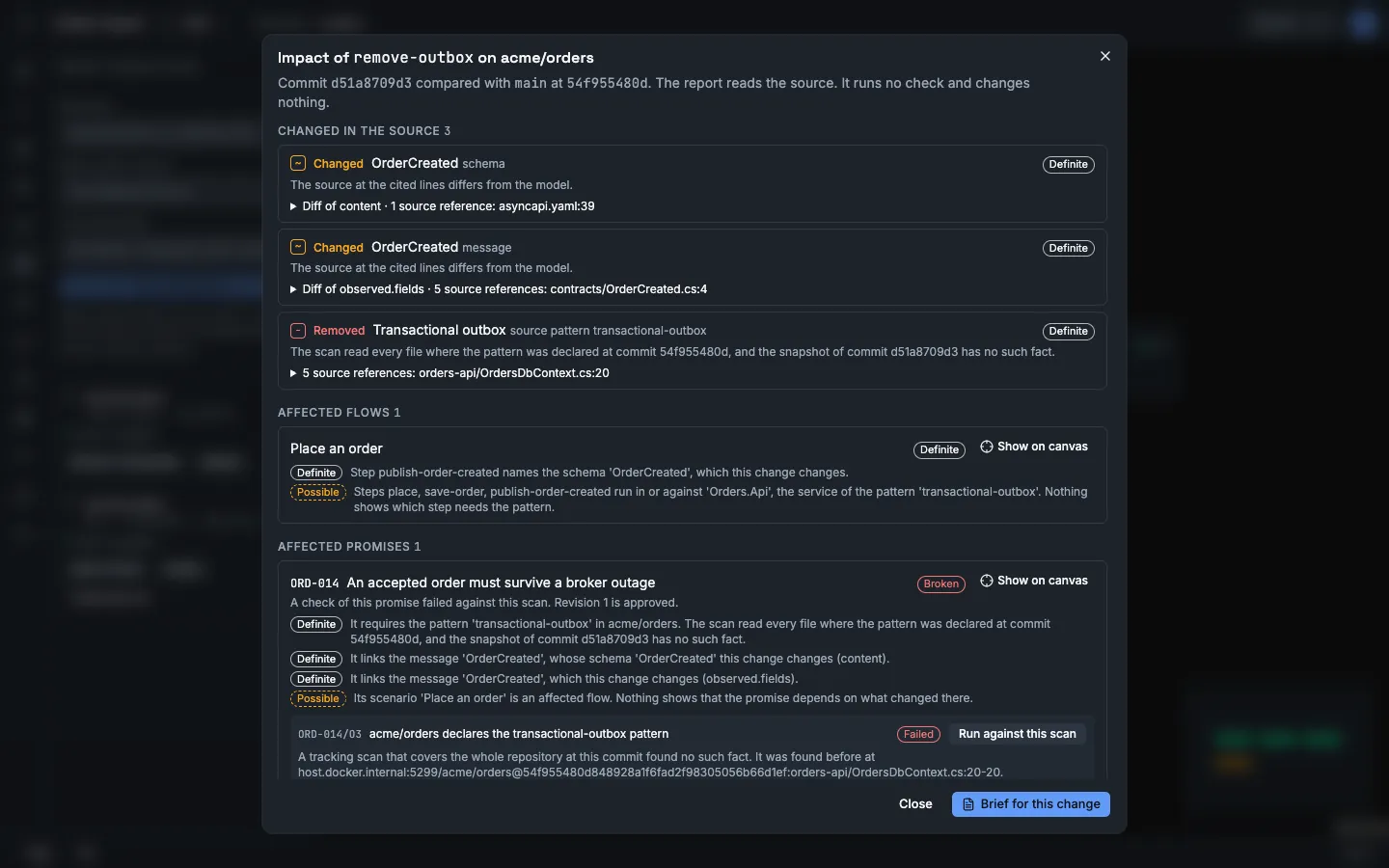
With the HTTP API:
-
Scan the ref.
Terminal window CHANGE_SCAN=$(api POST imports '{"repository": "acme/orders", "ref": "remove-outbox", "includePaths": [], "excludePaths": []}' | jq -r .id)for attempt in $(seq 1 60); doSTATUS=$(api GET "imports/$CHANGE_SCAN" | jq -r .status)if [ "$STATUS" != queued ] && [ "$STATUS" != running ]; then break; fisleep 1doneapi GET "imports/$CHANGE_SCAN" | jq -c '{status, kind, trackedRef, canDecide}'api GET "imports/$CHANGE_SCAN/proposals" | jq -r '.items[] | "\(.action) \(.entityKind) \(.name) \(.changes[0].field)"'{"status":"completed","kind":"comparison","trackedRef":"main","canDecide":false}change schema OrderCreated contentchange message OrderCreated observed.fieldsThe scan is a comparison, because the accepted facts follow
main. Its proposals are a preview. Nobody can accept them. The model does not change. -
Run the source check against the comparison.
Terminal window api POST "promises/$PROMISE/obligations/O3/run" "$(jq -n --arg scan "$CHANGE_SCAN" '{scanId: $scan}')" | jq -r '.result, .detail'The result is
unsupported. The detail says that the snapshot has no such fact, that a comparison scan cannot establish absence, and where the pattern was found before. Vellum does not report a failure that it cannot establish. -
Make the changed ref the one that the model follows. This is what happens when the change is merged.
Terminal window api POST "imports/$CHANGE_SCAN/track" | jq -c '{kind, trackedRef, canDecide}'{"kind":"tracking","trackedRef":"remove-outbox","canDecide":true} -
Run the source check again.
Terminal window api POST "promises/$PROMISE/obligations/O3/run" "$(jq -n --arg scan "$CHANGE_SCAN" '{scanId: $scan}')" | jq -r '.result, .detail'api GET "promises/$PROMISE" | jq -c '.current.evidenceStatus.counts'The result is
failed. The detail starts withA tracking scan that covers the whole repository at this commit found no such fact.and names the line where the pattern was found before. The counts are now:{"passed":1,"failed":1,"notRun":1,"unsupported":0,"stale":0} -
In the app, open Promises and select ORD-014. The dialog shows the failed obligation with what it checked and against which commit. Evidence gaps lists what has no evidence.
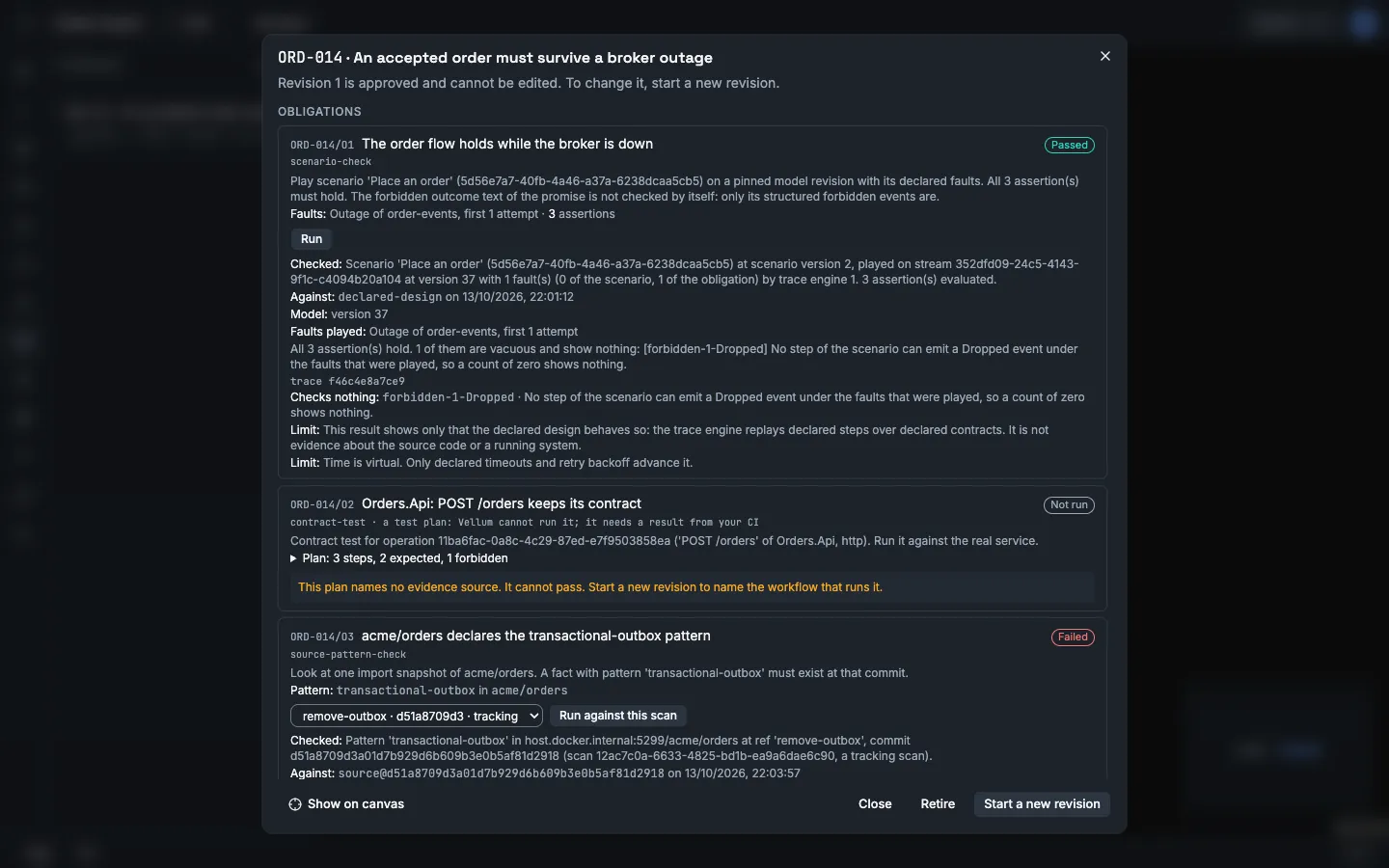
The scenario check still passes. The scenario is your declared design, and you did not change it. Vellum does not change a declared flow because the source changed. The source check is the evidence that the code no longer has what the promise needs.
Read the blockers
Section titled “Read the blockers”api GET build/manifest | jq -r '.buildReady, (.blockers[] | "\(.code) \(.message)")'The first line is false. The list holds these blockers for ORD-014:
promise-check-failed: one obligation failed its newest check.promise-gap: two assertions ofO1are vacuous, andO2is a test plan with no evidence source.promise-evidence-stale:O2has no result.review-CON-001: two operations on the path ofORD-014have no request schema and no response schema.
In the app, Build in the left toolbar shows the same list under Blockers, below the line that starts with Not build ready.
A blocker prevents Build ready. It does not prevent an export. Stale results and Build Ready blockers tells you how to clear each kind.
Export the brief for an agent
Section titled “Export the brief for an agent”A brief holds only the part of the model that one change needs: the promise, what it links, and the checks.
In the app:
- Open Build in the left toolbar.
- Below Brief for an agent, select the scope A change. In Scan, select the scan of
remove-outbox. - Select Preview the brief. The dialog says This scope is not build ready and lists each blocker. Below, it shows the text of the brief.
- Select Copy, or select Download.
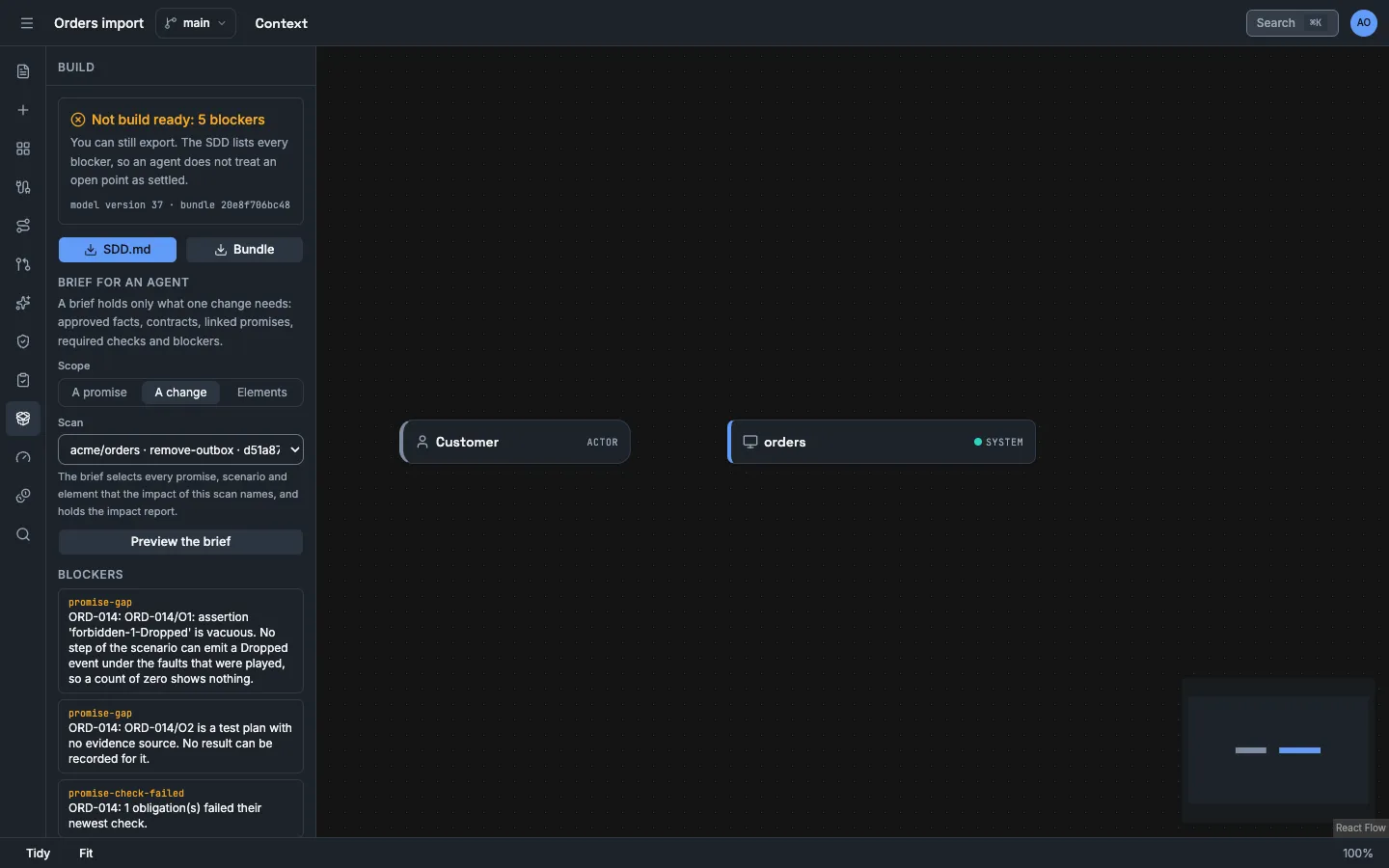
The brief of a change has one more section, 8. Change under review. It holds the impact report of the scan. The scope A promise gives the brief of the command below.
With the HTTP API:
api POST build/brief "$(jq -n --arg promise "$PROMISE" '{promiseIds: [$promise]}')" > brief.jsonjq -r .brief brief.json > brief.mdjq -c '.manifest | {format, buildReady, blockers: (.blockers | length)}' brief.jsonhead -n 3 brief.md{"format":"vellum-brief/1","buildReady":false,"blockers":7}# Orders import: build brief
Pinned model: branch stream `<stream ID>` at version <number>.brief.md gives a coding agent the approved facts, the promise ORD-014, the three obligations with their newest results, and the open blockers. The failed source check tells the agent what to correct: the Orders API must declare a transactional outbox again. The agent can record evidence and propose a change. It cannot change or approve the promise. See What an agent can and cannot do.
What you did
Section titled “What you did”- You declared a flow that the source does not show, and Vellum labelled your parts
declared. - You stated
ORD-014with a forbidden event and a required source pattern, and you approved it. - You ran two checks and read what each one does not show.
- You saw a comparison scan report a change with no claim about the promise, and a tracking scan fail the source check with a source line.
- You exported a brief that carries the failed check to an agent.