Import a repository and review the proposals
In this tutorial you scan a repository, read what Vellum found in it, and accept the findings into a model. The repository is the Orders fixture that the Vellum tests use. You need no GitHub account and no AI provider.
Before you start
Section titled “Before you start”- Complete Run Vellum on your machine. You are signed in as the owner of a workspace.
- You have the Vellum source on your machine, and Node.js 22 or later.
What you scan
Section titled “What you scan”The directory tests/Vellum.Tests/Fixtures/Repos/orders holds a small system: an ASP.NET Core API, a .NET billing service, a Go inventory worker, an OpenAPI file, an AsyncAPI file and a Compose file.
Vellum reads repositories through the GitHub REST API. The script examples/github-standin/server.mjs answers the calls of that API from directories of your machine. It serves the fixture as the repository acme/orders:
| Ref | Directory | Content |
|---|---|---|
main |
tests/Vellum.Tests/Fixtures/Repos/orders |
The system with a transactional outbox. |
remove-outbox |
tests/Vellum.Tests/Fixtures/Repos/orders-outbox-removed |
A change that removes the outbox and gives one field of OrderCreated a new name. |
To scan a repository on GitHub in place of the fixture, do not do the next two sections. Give owner/name of a public repository in the import form. Connect GitHub shows how to read a private repository.
Start the stand-in
Section titled “Start the stand-in”-
In the directory of the Vellum source, start the stand-in. Keep it running in its own terminal.
Terminal window node examples/github-standin/server.mjsIt prints one line for each ref, with the commit SHA and the number of files, and then its address:
http://127.0.0.1:5299. -
In a second terminal, check that it answers.
Terminal window curl -s http://127.0.0.1:5299/repos/acme/orders | jq -r '.full_name, .default_branch'The command prints
acme/ordersandmain.
The commit SHA of a ref is a hash of the files in its directory. The same files always give the same SHA.
Point the workspace at the stand-in
Section titled “Point the workspace at the stand-in”- On the home screen, select your workspace, then select Settings next to its list of projects.
- Select GitHub.
- In API base URL, give the address of the stand-in as Vellum can reach it:
- Vellum runs in Docker Compose on Docker Desktop:
http://host.docker.internal:5299. - Vellum runs on your machine with
dotnet run:http://localhost:5299.
- Vellum runs in Docker Compose on Docker Desktop:
- Select Save changes.
- Select Test connection. Vellum shows “Connected without a token: public repositories only.” and the number of requests that remain.
The local profile accepts an address on a private network and plain http. The hosted profile refuses both by default.
On Linux with Docker Engine, the name host.docker.internal does not exist in a container by default. Start the stand-in with --host 0.0.0.0, and give the address of the Docker bridge of your machine, for example http://172.17.0.1:5299.
When you complete the tutorials, put the value https://api.github.com back.
Scan the repository
Section titled “Scan the repository”- On the home screen, select your workspace, then select + New Project. In Project name, give
Orders import. Select Create. - Open the project.
- Select Import from GitHub in the left toolbar.
- In Repository, give
acme/orders. - In Branch, tag or commit, give
main. - Leave Only these folders empty.
- Select Scan repository.
The scan shows “Listing files”, then “Reading files”, then “Scan complete”. The button on the scan reads Review 21 proposals.
A scan reads one commit. It runs no code from the repository. It does not change the model.
Review the proposals
Section titled “Review the proposals”-
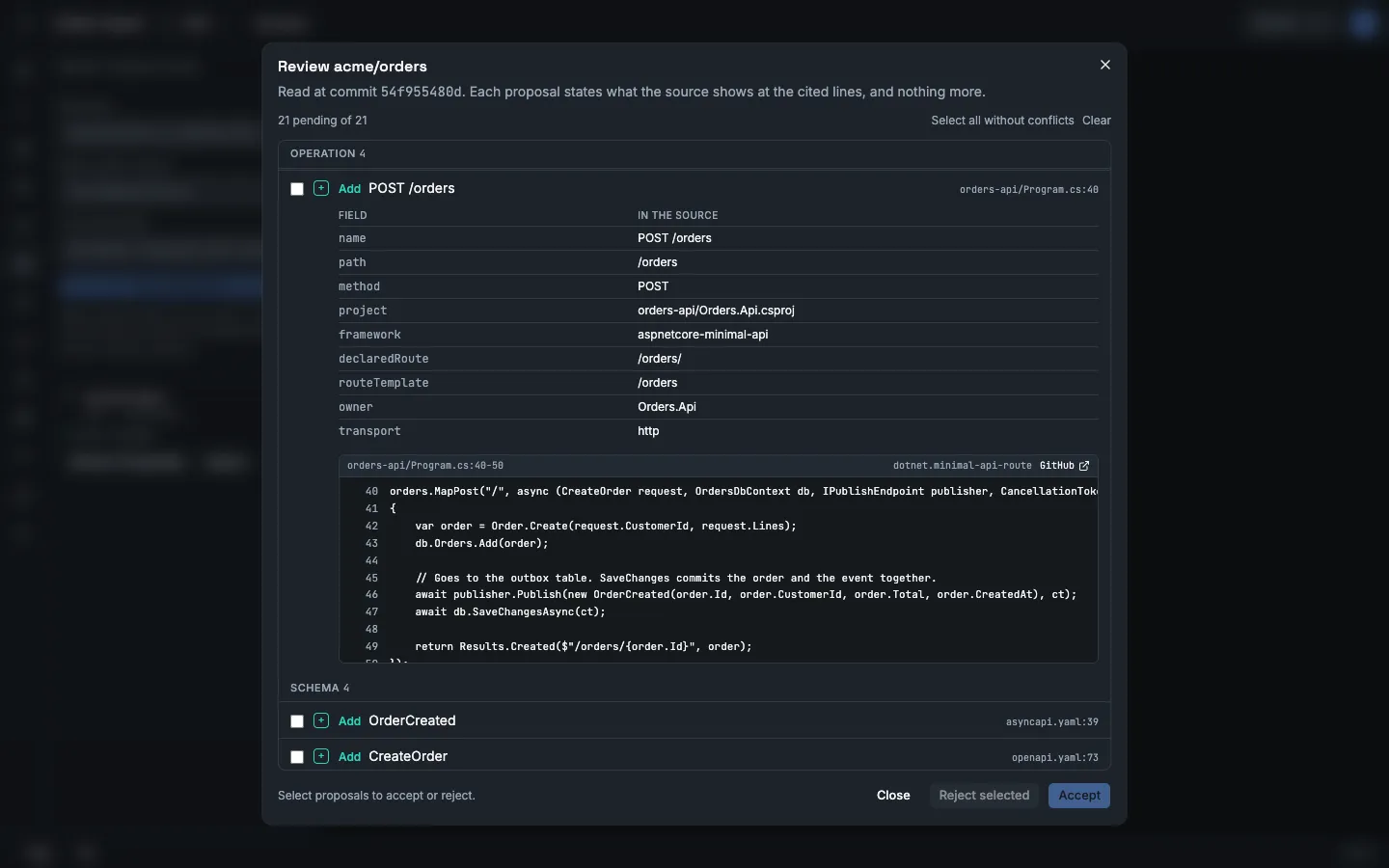
Select Review 21 proposals. The dialog Review acme/orders opens. The line below the title gives the commit that the scan read.
-
Read the list. Vellum groups the proposals by kind. Each row has an action, a name and the first source line. In this scan every action is Add, because the model is empty.
Kind Proposals Element orders,postgres,Billing,inventory-worker,Orders.ApiChannel billing.order-created,inventory.order-created,order-events,order-events.dlxSchema OrderCreated,CreateOrder,Order,OrderLineOperation GET /healthz(two services),GET /orders/{id},POST /ordersBinding inventory.order-createdbound toorder-eventsSubscription The consumer of Billing and the consumer of the inventory worker Message OrderCreated -
Select the row POST /orders. The row opens. The table shows each field that the source gives. Below it, Vellum shows the lines that it read:
orders-api/Program.cs, lines 40 to 50. The rule that found them isdotnet.minimal-api-route. -
Select the row of the message OrderCreated. It has more than one source: the C# record in
contracts/OrderCreated.cs, the message inasyncapi.yaml, the line that publishes it and the consumer in Billing. -
Select Select all without conflicts.
-
Select Accept 21.
Vellum writes the 21 facts to the model. Each fact gets the label observed-in-source, the commit, the file and the lines, and your account as the person who accepted it.
To refuse a proposal, select it and select Reject selected. A later scan does not propose a rejected fact again while the source stays the same.
The link GitHub on a source line opens the file on the web address of the repository. The stand-in serves the API only, so the link does not open a page in this tutorial.
Read what the model now holds
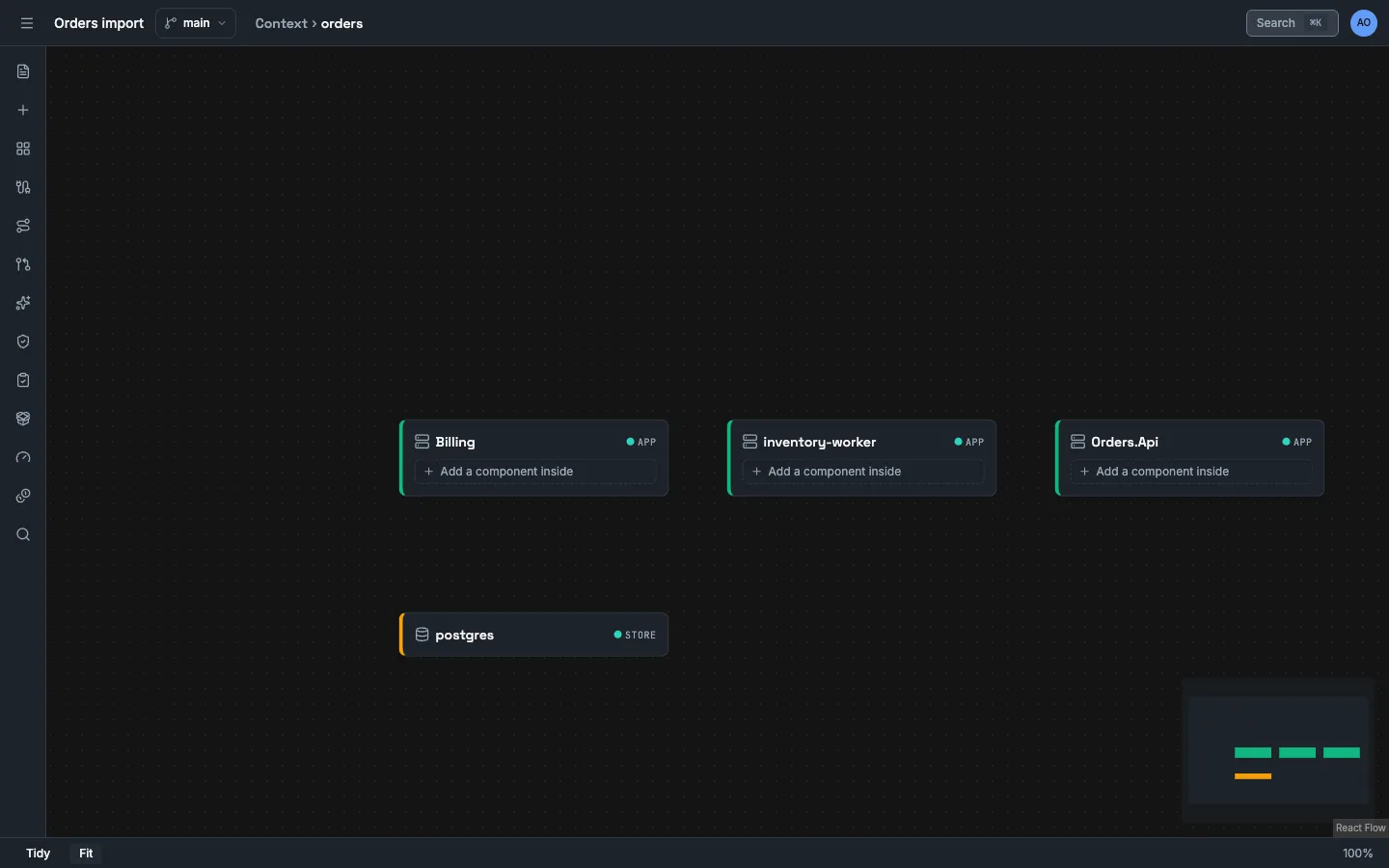
Section titled “Read what the model now holds”- Close the dialog and the flyout. The canvas shows the system
orders. - Right-click
ordersand select Drill into. The canvas showsOrders.Api,Billing,inventory-workerandpostgres. - Select Contracts in the left toolbar. Operations, Channels and Subscriptions list what you accepted.
Three things are true about this model:
- It holds what the source declares, and nothing more. The source shows that
POST /ordersexists. It does not show how long the call takes, or that it works. - It has no behaviour. The scan found no scenario. Lines in source code do not state the order of a flow. You declare a flow, or the assistant proposes one.
- It has gaps. The fixture binds the queue of Billing by a MassTransit convention that is not in the source. Vellum proposes no binding for it. A person adds that binding by hand in Contracts.
Scan again
Section titled “Scan again”- Open Import from GitHub and select Scan repository again, with the same values.
- Select Open review on the new scan. The dialog shows “The source matches the model. This scan proposes no change.”
A second scan of the same commit compares the source with the model and finds no difference.
What you did
Section titled “What you did”- You scanned one commit of a repository with no GitHub account.
- You read proposals with the file, the lines and the rule behind each one.
- You accepted them, and the model now labels each fact
observed-in-source.
- The promise loop: from a question to evidence uses this project and the ref
remove-outbox. - Import a repository
- Check the impact of a change
- Extraction rules
- Evidence and truth labels