Save revisions and compare variants
This guide shows you how to save a revision of the model, how to make a variant and how to compare two models. You need the editor role to save a revision and to make a variant. A viewer can open a revision and compare.
Know the three words
Section titled “Know the three words”| Word | Meaning | Can it change? |
|---|---|---|
| Main | The model of the project. | Yes. |
| Revision | A named copy of main at one version. | No. |
| Variant | A second model that starts as a copy of main or of a revision. It has its own cost sheet. | Yes. |
A variant is for an alternative that you want to keep next to main. A draft is for a change that you want to merge into main. See Work in a draft.
Know the limits
Section titled “Know the limits”- Vellum cannot merge a variant into main.
- Vellum has no control and no endpoint that deletes or closes a variant.
- Vellum has no control and no endpoint that deletes or renames a revision.
- A revision holds the model. It holds no cost sheet and no stress run.
Find the model switcher
Section titled “Find the model switcher”The model switcher is the button in the top bar of a project, to the right of the project name. It shows the model that the workbench shows. Select it to see the lists Drafts, Variants and Revisions · read-only and the actions on this page.
Save a revision
Section titled “Save a revision”- Select the model switcher.
- Select Name a revision of main….
- Enter a Revision name. The Note is optional.
- Select Save revision.
The list Revisions · read-only then shows the revision with the version of main, the person who saved it and the date.
A revision name is unique in the project. A second revision with the same name is refused, and the dialog shows No revision was saved. and A revision with this name already exists.
Open a revision
Section titled “Open a revision”- Select the model switcher.
- Below Revisions · read-only, select the revision.
The model switcher then shows Revision, the name and read-only. The canvas shows the model of the revision. You can pan, zoom, select and drill in. You cannot move, add, change or delete.
The other panels do not show the revision. Each of them says in a note at its top that it shows main. To see the review findings, the cost or the build state of a revision, compare it: see Compare two models.
Make a variant
Section titled “Make a variant”- Select the model switcher.
- Select New variant….
- Enter a Variant name.
- For Start from, select main, as it is now or a revision.
- Select Create variant.
The workbench then shows the variant. Its cost sheet starts as a copy of the cost sheet of main. Vellum makes the variant and the copy together: both exist, or neither exists. If the request fails, the dialog shows No variant was created. and the reason.
The Costs panel has a second control, New variant from main. It forks main and copies the cost sheet that the panel shows.
Change a variant
Section titled “Change a variant”- Select the model switcher.
- Below Variants, select the variant.
- Change the model and the cost sheet as you do on main.
The same panels follow a variant as follow a draft. Work in a draft has the list.
Compare two models
Section titled “Compare two models”- Select the model switcher.
- Select Compare two models….
- Select a model for Left and a different model for Right. Each list holds main, the open drafts, the variants and the revisions.
The dialog shows five parts. Each part is what one endpoint of Vellum computes. The dialog states differences. It gives no verdict and no score.
| Part | What it shows | Where the values come from |
|---|---|---|
| Model and contracts | Each element, relationship, message, operation, channel, subscription and binding that only one model has, or that differs. Select a row to see the fields. | The two models. Each row shows the truth label of its fact. |
| Review findings | The counts of the findings of each model, and the findings that block Build Ready. | The deterministic rules. Not measured. |
| Cost for one month | The total of the known lines of each side and the difference. | The two cost sheets and the price book. Estimated. Not measured. |
| Stress result of the same profile | The newest run of one profile on each model: throughput, latency and counts. | The seeded simulation. Estimated. Not measured. |
| Build Ready and promises | Build Ready and the blockers of each model, and the obligation results of the project. | Recorded evidence. |
A value that Vellum does not have is shown as unknown with the reason. It is never shown as zero.
- The cost part shows unknown when one side is a revision. A revision holds no cost sheet. Make a variant from the revision to estimate its cost.
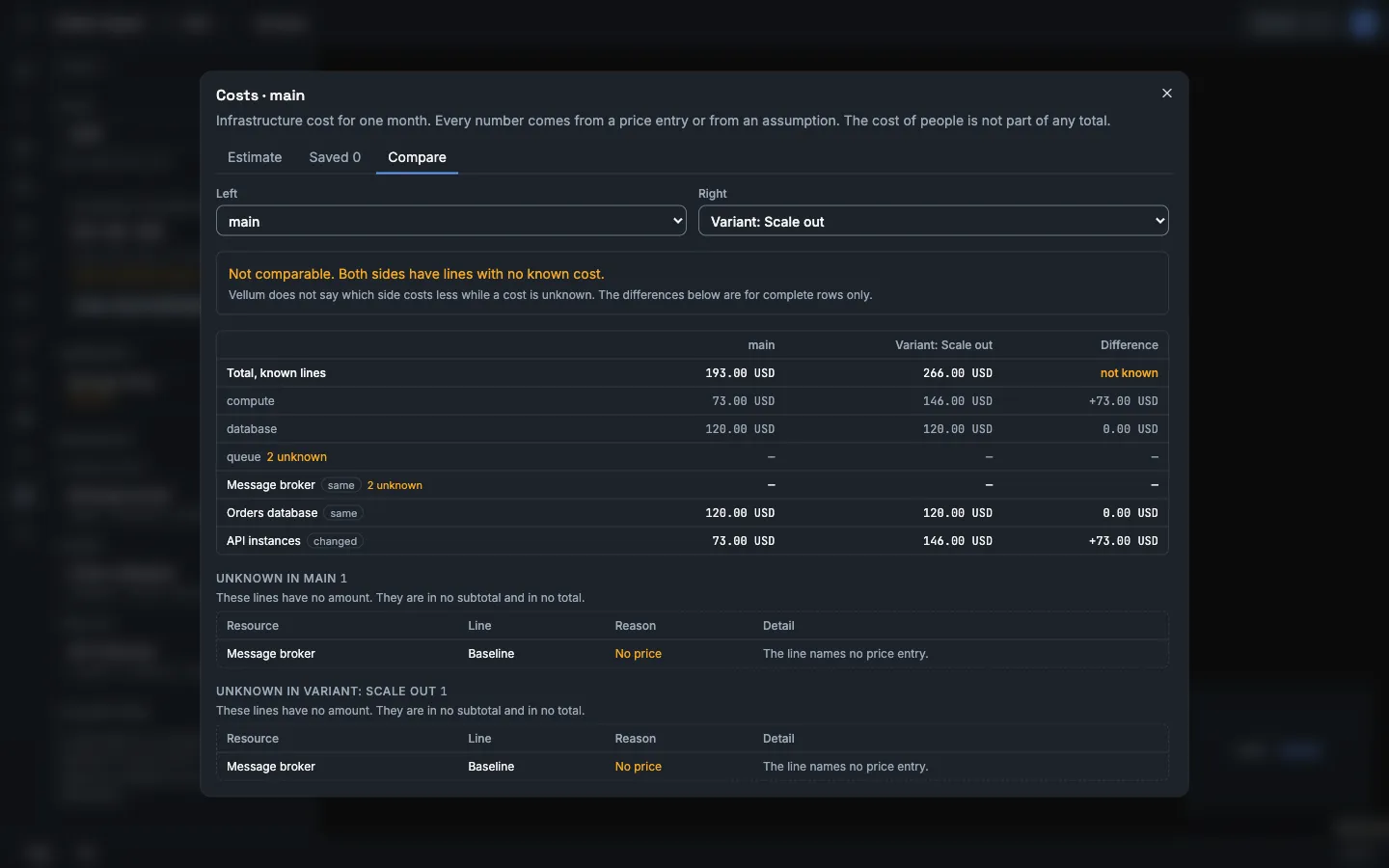
- The cost part shows Not comparable. and the reason when a side has a line with no known cost, an empty cost sheet or more than one currency. An empty cost sheet is not a cost of zero.
- The stress part shows unknown when no profile has a run on both models. Open Stress on each model and run the same profile.
- Promises belong to the project and not to one model. The dialog shows their results one time for the two sides.
Compare only the cost
Section titled “Compare only the cost”- Select Costs, then Lines, saved estimates and compare.
- Select Compare.
- Select a branch for Left and a different branch for Right.
This view also shows each category and each resource. It says which side costs less only when the two sides can be compared. Estimate costs has the details.
Use the API
Section titled “Use the API”The curl examples use the session cookie of a signed-in person in the file vellum.cookies. Use the HTTP API shows how to sign in. An agent token cannot make the write calls on this page: those endpoints are not open to agent tokens and answer 403.
Save and read a revision
Section titled “Save and read a revision”Send the request. The id is a new UUID that you make. The note is optional text.
curl -X POST "http://localhost:8080/api/projects/<project-id>/revisions" \ -b vellum.cookies \ -H "Content-Type: application/json" \ -d '{"id":"<new-uuid>","name":"before-outbox","note":"The model before the outbox change"}'version in the answer is the version of main that the revision holds.
GET /api/projects/{projectId}/revisionslists the revisions.GET /api/projects/{projectId}/revisions/{revisionId}gives one.GET /api/projects/{projectId}/revisions/{revisionId}/modelgives the whole model of the revision:elements,relationships,messages,operations,channels,subscriptionsandbindings, in the shapes of the model lists.
A second revision with the same name gets 409 with A revision with this name already exists. A request with an id that the project already has gives the stored revision and changes nothing.
Two endpoints read a revision instead of main when you add ?revisionId=<revision-id>:
GET /api/projects/{projectId}/review/findingsGET /api/projects/{projectId}/build/manifest
Make a variant
Section titled “Make a variant”curl -X POST "http://localhost:8080/api/projects/<project-id>/variants" \ -b vellum.cookies \ -H "Content-Type: application/json" \ -d '{"id":"<new-uuid>","name":"with-queue","baseRevisionId":"<revision-id>","costSheetFrom":"main"}'| Field | Value |
|---|---|
id |
A new UUID. |
name |
Unique in the project. |
baseRevisionId |
The revision to copy, or null to copy main as it is now. |
costSheetFrom |
Optional. main, or the streamId of an open draft or variant. The variant copies that cost sheet. When you leave it out, the variant copies the sheet of the branch that the model comes from. |
The answer has streamId. That value is the branch ID of the variant. Keep it.
GET /api/projects/{projectId}/variants lists the variants. GET /api/projects/{projectId}/variants/{variantId} gives one.
Change a variant
Section titled “Change a variant”The model endpoints accept ?branchId=<streamId>. With it, the request reads or writes the variant and not main.
curl "http://localhost:8080/api/projects/<project-id>/elements?branchId=<stream-id>" \ -b vellum.cookiesThe endpoints for elements, relationships, messages, operations, channels, subscriptions and bindings accept branchId. So do the cost endpoints, the scenario run, the stress run, the review findings and the build manifest.
A branchId that is not an open branch of the project gets 400 with the error type invalid_branch.
Compare two models
Section titled “Compare two models”curl "http://localhost:8080/api/projects/<project-id>/model/compare?left=main&right=<stream-id>" \ -b vellum.cookiesEach of left and right is main, the streamId of an open draft or variant, or revision:<revision-id>. A viewer can call it.
{ "left": { "streamId": "5a3d8f6e-0b7a-4e0e-9d0b-0c9d1a1b2c3d", "version": 45, "revisionId": null, "revisionName": null }, "right": { "streamId": "2b9d2c0e-9a0b-4a47-8a53-5f1a0c7a3e90", "version": 3, "revisionId": null, "revisionName": null }, "changes": [ { "entityType": "element", "entityId": "c4a8f6de-58a3-4b55-93a3-1b8c0b6c5f01", "changeKind": "added", "left": null, "right": { "id": "c4a8f6de-58a3-4b55-93a3-1b8c0b6c5f01", "kind": "store", "name": "Outbox" } } ]}| Field | Meaning |
|---|---|
changeKind |
added: only the right model has the fact. removed: only the left model has it. modified: the two models hold it with different values. |
left, right |
The fact in each model, in the shape of the model lists. null when that model does not have it. |
The value in the example is short. A stale mark alone is no difference.
The other parts of the comparison have their own endpoints:
- Cost:
GET /api/projects/{projectId}/costs/comparewithleftandright. Each value ismainor thestreamIdof an open draft or variant. - Stress:
GET /api/projects/{projectId}/stress/comparewith the two run IDs asleftandright. See Stress a flow. - Review and build: add
?branchId=or?revisionId=toreview/findingsand tobuild/manifest.
Two more comparisons use measured load-test results. See Load test with k6.